
Have you ever stared at a web address bar and wondered what a single letter could possibly change? You know both terms have something to do with the internet, but when you see them side-by-side, the actual functional difference between them can feel incredibly confusing. In reality, while both serve as digital pipelines designed to carry information across the internet, that single letter “S” determines whether your data pipeline is completely transparent or locked down with ironclad security.
Today, we are going to look at another ultimate tech pairing: HTTP and HTTPS. By the time you finish reading this guide, you will understand exactly why checking for that small padlock icon in your browser’s address bar is one of the most critical steps you can take to protect your personal information and navigate the web safely.
1. Everyday Metaphors: Understanding the Core Concepts
To demystify how data travels across the global network, let’s look at two simple, real-world analogies that illustrate how these protocols handle your sensitive information.
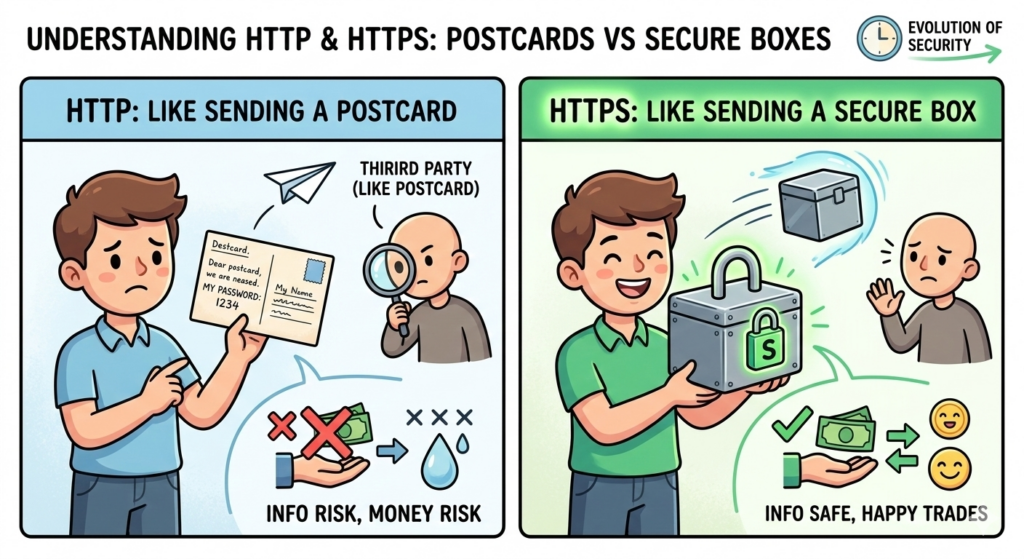
1) HTTP = An Open Postcard
Imagine writing a letter to a friend containing sensitive personal details, but instead of sealing it inside a heavy paper envelope, you write it directly onto the back of an open postcard.
As that postcard travels through the postal system, the mail carrier, the sorting facility workers, and even a curious neighbor standing near your mailbox can easily read every single word you wrote if they choose to look.
In the digital world, HTTP works exactly like this open postcard. When you log into an old website or submit a form over a standard HTTP connection, your usernames, passwords, and credit card numbers are transmitted across the network in clear, plain text. Its defining characteristic is absolute transparency, which leaves it completely exposed to outside eyes.
2) HTTPS = A Locked Steel Vault
Now, let’s change the scenario. Instead of writing your message on an open postcard, you place your letter inside a heavy, reinforced steel lockbox, secure it with a high-grade physical padlock, and ship it to its destination.
Even if a malicious actor intercepts the box while it is in transit, they cannot read your message because they do not possess the unique key required to pop open the padlock. They are left holding a useless piece of locked metal.
The “S” in HTTPS stands for Secure. It takes the exact same data pipeline used by HTTP and wraps it in a powerful layer of cryptographic encryption. This encryption acts as a protective shield, scrambling your data into unreadable code before it ever leaves your device, ensuring that your private details stay private.
2. The “What If” Scenarios: Why Encryption is Crucial
To see the true impact of this technical distinction, let’s look at what happens behind the scenes during a data transmission when only one of these protocols is active.
Scenario A: Browsing via a Strict HTTP Connection
- The Reality: You are sitting at a local coffee shop, connected to the public Wi-Fi network. You open an HTTP website and type in the message: “My master vault password is 1234.” The data travels through the air as a transparent stream.
- The Result: A malicious hacker sitting two tables away running basic packet-sniffing software can look directly through your digital pipeline. Because there is no encryption shield, they intercept your text instantly, gaining total access to your private credentials. Your personal security is compromised because your data was sent out in the open.
Scenario B: Browsing via an Encrypted HTTPS Connection
- The Reality: You perform the exact same action on the same public Wi-Fi network, but this time you are using an encrypted HTTPS connection. You send the identical password to your destination server.
- The Result: The hacker intercepts the data packet once again, but instead of seeing clear text, their screen displays a completely randomized, nonsensical string of characters like
&2f9!kXsQ9@mZ. Because the data is locked inside a digital vault, the hacker cannot decrypt the message and eventually gives up. Your private information arrives safely at its destination.
As this data blueprint shows, the fundamental pipeline remains identical, but the addition of a cryptographic lock makes all the difference in keeping your online footprint secure.
THE DATA INTERCEPTION BLUEPRINT
"My password is 1234"
Intercepted in plain text by hackers
"&2f9!kXsQ9@mZ"
Scrambled into secure code
3. The Evolutionary Timeline: The Shift to Total Security
To understand why the internet relies on two distinct versions of the same core protocol, it helps to look at how network engineering has evolved alongside consumer culture over the past few decades.
1) The Past: The Era of Pure Efficiency
In the early days of the World Wide Web during the 1990s, HTTP was the undisputed standard. Security was not an immediate priority for a few key reasons:
- Academic Origins: Early web networks were primarily used by universities and research laboratories to share public academic papers. Because there were no e-commerce storefronts, online banks, or personal profile pages, there was almost no sensitive data to hide.
- Hardware Limitations: Vintage computers and early network routing infrastructure were incredibly slow by modern standards. Processing the complex mathematical equations required to encrypt and decrypt web traffic would have overwhelmed early processors, causing webpages to take twenty to thirty minutes just to load.
- Prohibitive Licensing Fees: In the early internet era, security certificates were treated as premium corporate luxury products. They cost hundreds of dollars per year in recurring licensing fees, making it difficult for individual creators or small businesses to secure their domains.
2) The Present: Security as a Necessity for Survival
Today, the internet landscape has shifted completely, and HTTPS has become an absolute requirement for any functional website:
- Rise of Highly Sensitive Data: Modern users manage their entire lives online—including banking, health care records, real estate investments, and private communications. Using an unencrypted protocol like HTTP for these transactions is far too dangerous.
- Hardware Standardization: Modern smartphones and computers feature highly advanced, multi-core processors that can calculate encryption mathematics in milliseconds. Users can browse highly secure sites without experiencing any drop in loading speeds.
- The Era of Free Certificates: Thanks to global non-profit security initiatives like Let's Encrypt, the financial barriers to web security have been eliminated. Digital certificates are now available completely free of charge, allowing any website operator to activate the padlock icon instantly.
4. Technical Breakdown: Decoding the Acronyms
To truly grasp how these communication protocols operate under the hood, let's break down the underlying technical terminology:
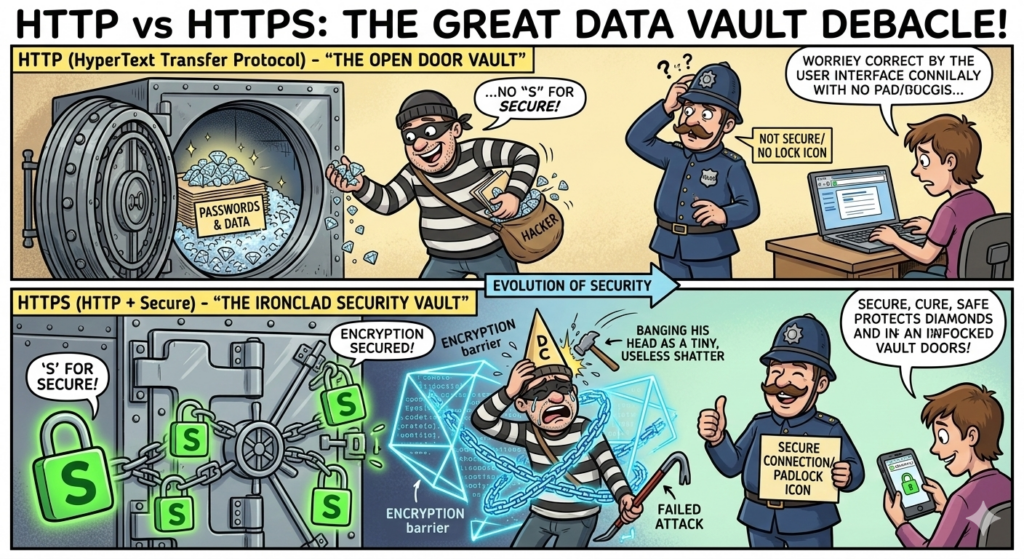
1) HTTP (HyperText Transfer Protocol)
- HyperText: This refers to the core organizational fabric of the web—the text, images, and clickable hyperlinks that connect webpages together.
- Transfer: This describes the core functional action of moving data packets across the global network from a hosting server to your personal web browser.
- Protocol: A formalized set of digital rules and communication standards that allows completely different software programs and operating systems to talk to one another smoothly.
2) HTTPS (HTTP Secure)
- Secure: This indicates that the standard transport protocol has been successfully combined with an underlying cryptographic security layer.
- SSL/TLS: These abbreviations stand for Secure Sockets Layer and its modern, more advanced successor, Transport Layer Security. This technology acts as the digital locksmith that scrambles your information before transmission, transforming standard HTTP into a secure HTTPS connection.
"HTTP carries the message, but HTTPS locks the vault. When the 'S' joins the journey, your data finally finds its safe harbor."
5. Side-by-Side Comparison: Head-to-Head Analysis
To help you quickly differentiate between these two primary web protocols during your next system audit or security check, let's review their core operational boundaries:
| Category | HTTP (The Postcard) | HTTPS (The Vault) |
|---|---|---|
| Core Operational Role | Transmits web data quickly across the network without modification. | Encrypts web data before transmission to ensure absolute privacy. |
| Data Security Level | Low; vulnerable to eavesdropping and data packet tampering. | High; fully encrypted using modern security algorithms. |
| Browser Address Bar Display | Displays a "Not Secure" warning label with no padlock icon. | Displays a secure padlock icon next to the domain name. |
| Primary Recommended Use | Public informational directories with no login fields. | Portals handling passwords, financial checkouts, and personal forms. |

6. The Trust Ecosystem: Who Verifies Web Identity?
When you click on the padlock icon in your browser bar, you can view the digital certificate protecting the site. These credentials are generated and verified by independent, globally recognized security entities known as Certificate Authorities (CAs). They act as digital passport offices, verifying that a website is legitimate before granting it an encryption key.
- Global Infrastructure Leaders: Organizations like Let's Encrypt, DigiCert, and Sectigo issue hundreds of millions of certificates worldwide, establishing the baseline security infrastructure for modern global enterprise networks.
- Regional & Managed Providers: Infrastructure platforms and web registrars like Gabia, Cafe24, and domestic security providers help local companies integrate these global validation standards into their web deployments.
7. One-Sentence Summary
While HTTP acts as an open vault with its doors wide open for anyone to look inside, HTTPS is a reinforced vault locked down with a custom padlock that only the authorized owner can open.
Conclusion: Key Takeaways for Today's Digital Strategy
Understanding the functional line between HTTP and HTTPS is crucial for managing data security and building a trustworthy online presence.
- Never Input Data on HTTP Sites: Always check your browser’s address bar before typing sensitive information like passwords or financial details. If the padlock icon is missing or a "Not Secure" warning is visible, leave the page immediately to prevent identity theft.
- Enforce Full Site Encryption: If you manage an online platform, portfolio, or e-commerce storefront, ensure that your technical team configures a permanent server redirect from HTTP to HTTPS. This simple configuration ensures that all inbound traffic is automatically protected by default.
- Boost Your Search Visibility: Modern search engines like Google actively penalize unencrypted websites by lowering their visibility in user search queries. Migrating your platform to full HTTPS is no longer just a defensive security measure—it is a vital component of search engine optimization (SEO) and brand growth.
AI Disclosure: Created in collaboration with Google Gemini. All core content was authored, reviewed, and edited by the author.