
In the interconnected landscape of modern software engineering, web applications rarely operate in total isolation. Instead, they function by constantly linking disparate services together to provide a seamless user experience. To make this digital ecosystem work, two foundational components act as the ultimate collaborative pair: APIs and SDKs. They are the needle and thread of software integration.
To use a familiar real-world comparison, imagine the relationship between a restaurant waiter taking your specific order and a pre-packaged meal kit that delivers all the ingredients along with a step-by-step recipe directly to your kitchen. If you have ever wondered why software engineers and product managers constantly use phrases like “Did we connect the API?” or “Have you installed the latest SDK?”, this comprehensive guide will break down the mechanics behind these tools so you can understand them at a single glance.
1. Everyday Metaphors: Understanding the Core Concepts
To easily understand how these software integration systems function without getting buried in complex programming jargon, let’s explore two relatable analogies that clear up the confusion.
1) API (Application Programming Interface) = The Restaurant Waiter
When you visit a restaurant, you do not walk straight into the kitchen, open the refrigerator, and turn on the commercial stove yourself. Instead, you sit at a table, read the menu, and give your specific order to a waiter. The waiter carries that structured request to the kitchen staff, waits for the chefs to prepare the food, and then brings the finished dish back to your table.
In the digital world, an API is that exact waiter. If your custom application needs to fetch Google Maps data, process a credit card transaction via Stripe, or request a weather forecast, it doesn’t log into their central databases directly. Instead, your app sends a structured request across the internet to an API window. The API securely delivers your message to the external platform’s system and returns with the exact data payload you requested. Efficient, highly targeted communication is its primary goal.
2) SDK (Software Development Kit) = The Complete Meal Kit and Recipe Guide
Now, consider a different scenario. Instead of just ordering a single completed dish from a restaurant, you purchase a comprehensive gourmet meal kit. This kit doesn’t just include a receipt or a simple delivery channel; it comes packed with the raw ingredients, pre-measured sauces, specialty cooking utensils, and a detailed instruction booklet explaining exactly how to assemble the meal in your own home.
An SDK is that entire meal kit package. It is a comprehensive, all-in-one developer toolset that contains everything a software engineer needs to build an application or integrate a massive ecosystem of functions from scratch. Rather than forcing you to write every single line of communication code by hand, an SDK hands you pre-built software libraries, code samples, debugging tools, documentation, and—critically—the underlying APIs required to make the feature work immediately.
2. The “What If” Scenarios: Why a Balanced Strategy Requires Both
To truly appreciate why software engineers rely on both components simultaneously, let’s examine what happens to a engineering pipeline when a development team attempts to build an application using only one tool while discarding the other.
Scenario A: Building with an API Only (The Solo Waiter)
- The Reality: A development team wants to add third-party location mapping to their new mobile app. They choose to utilize raw API endpoints directly without downloading any supporting software kits.
- The Result: While the team can technically send data requests to the external server, they must build the entire technical foundation by hand. They have to manually write code to handle network connectivity dropouts, configure custom security headers, structure data translation blocks, and design the physical visual map interface completely from scratch. The data connection exists, but the implementation becomes a tedious, labor-intensive manual construction project that slows down product launch timelines.
Scenario B: Building with an SDK Only (The Closed Kit)
- The Reality: A developer downloads a massive, highly optimized development kit packed with local design components, widgets, and offline rendering tools, but has no live connection channel to the outside world.
- The Result: The developer has access to an excellent local development environment, but the application remains completely isolated. Without an underlying API acting as the active communication channel to pipe live data back and forth between the user’s device and the cloud, the application becomes an expensive piece of static hardware—unable to update, process payments, or sync profile accounts in real time.
The Architectural Solution: A Unified Partnership
Because of these limitations, high-performance software systems ensure these tools always work together. The SDK acts as the overall structural framework, providing the tools, templates, and pre-built components, while the API lives inside that framework as the dedicated engine that drives active communication and data exchanges.
3. Etymology and Origins: Decoding the Acronyms
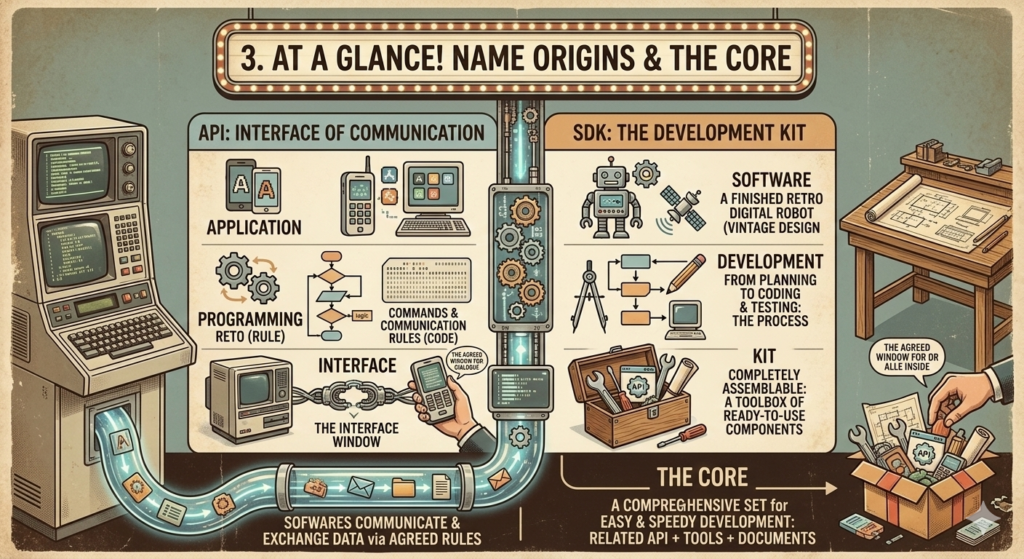
To truly understand how these systems establish communication, let’s break down the literal meaning of each word in their names:
1) API (Application Programming Interface)
- Application: Refers directly to the software programs, mobile apps, or web platforms we interact with daily.
- Programming: The structured code rules and syntax used to give explicit commands to a computer system.
- Interface: A shared boundary or interaction window where two independent systems meet and exchange info.
- The Core Definition: A secure, standardized communication window that allows entirely different software applications to seamlessly talk to each other and trade data based on a strict set of rule agreements.
2) SDK (Software Development Kit)
- Software: The final digital asset, application, or platform that an engineering team is attempting to build.
- Development: The entire lifecycle of creation—spanning design, coding, compiling, testing, and debugging.
- Kit: Much like a physical model building kit or an advanced toolbox, this represents a pre-packaged bundle of tools ready for immediate deployment.
- The Core Definition: A comprehensive global toolbox provided by a technology vendor that contains all the libraries, documentation, code samples, and APIs necessary to easily build or integrate applications for a specific operating environment.
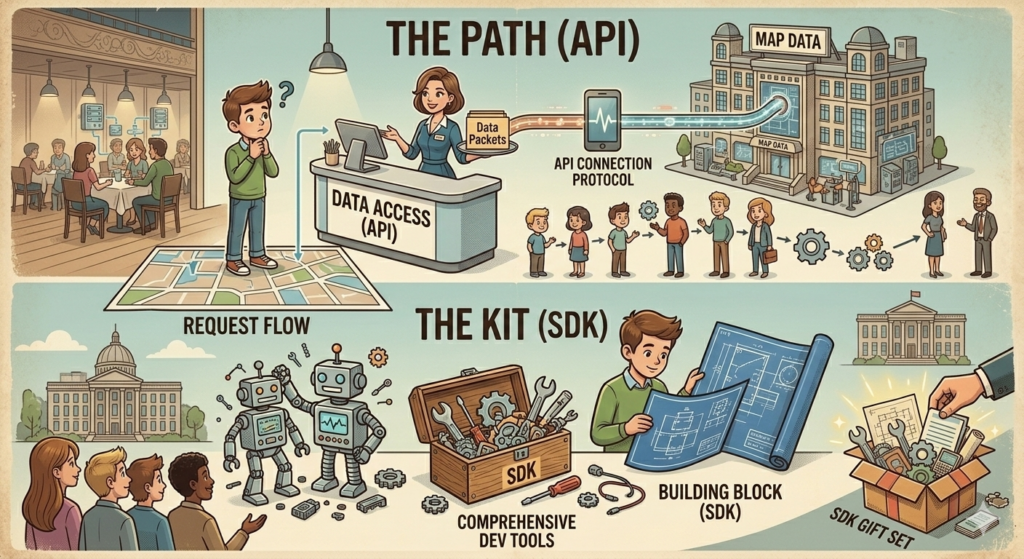
4. The Toy Block Metaphor: Assembling an Application Architecture
To see how this works in practice, think about building an intricate toy castle using premium plastic blocks.
Suppose you want to add a rare, specialized golden crown piece to the top of your tower, but that specific block is manufactured and held by a separate toy store down the street. To solve this problem, you need two distinct layers of support:
First, you need a reliable Order Hotline (The API). This allows your local building site to call up the external vendor, verify availability, and request that the single block be shipped immediately to your location.
Second, you need a Specialized Adaptation Tool and Blueprint Set (The SDK). Once the delivery truck drops off the golden crown, you cannot simply glue it on haphazardly. You need the exact structural connectors, specialized wrenches, and instruction diagrams provided in the kit to securely lock that external piece into your existing castle walls so it fits perfectly and functions correctly.
5. Side-by-Side Comparison: Head-to-Head Analysis
To help you clearly differentiate between these two critical integration tools during your next product architecture review, let’s look at their core traits side-by-side:
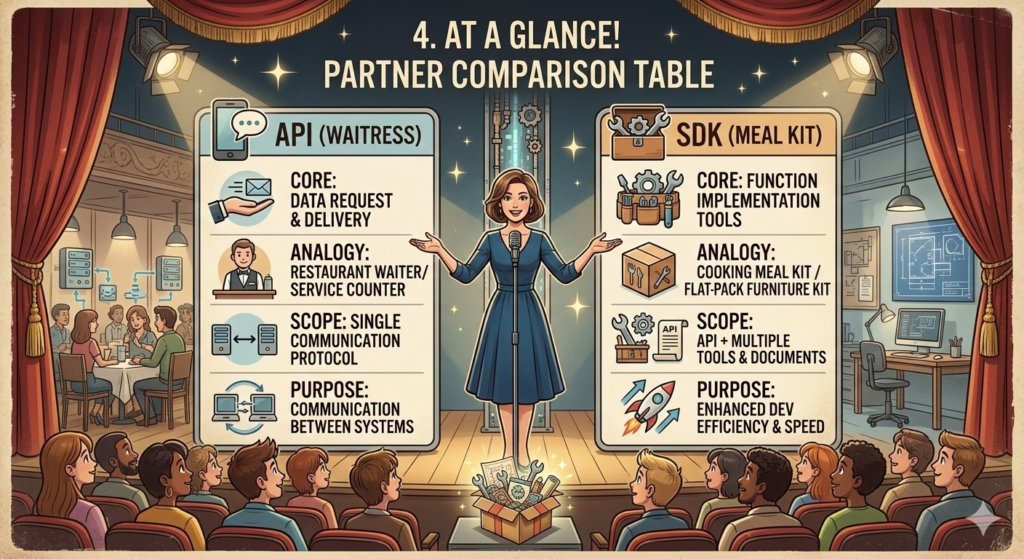
| Category | API (The Focused Interface) | SDK (The Global Toolbox) |
|---|---|---|
| Core Operational Role | Acts as a secure window for data requests and delivery. | Serves as an all-in-one suite of creation tools. |
| Real-World Analogy | A restaurant waiter taking your order. | A complete meal kit with ingredients and a recipe. |
| Scope of Inclusion | Consists of a single, standardized communication protocol. | Represents a massive bundle of libraries, docs, and APIs. |
| Primary Objective | Establishes secure communication between platforms. | Accelerates the speed and efficiency of development. |
| Installation Method | Accessed directly via a web URL or network endpoint. | Must be downloaded and compiled into your codebase. |
6. Industry Implementation: Who Provides These Services?
When looking at enterprise technology strategies, major service providers distribute both tools depending on whether a client just needs raw data data access or a complete plug-and-play development suite.
1) API Providers (Data Gateways)
These organizations focus on building highly scalable, secure network endpoints that connect external developers to their internal databases.
- Global Ecosystems: Platforms such as the Google Maps API for geospatial mapping, the Stripe API for financial transaction processing, and the OpenAI API for streaming advanced artificial intelligence capabilities into independent custom software.
- Regional Providers: Government frameworks like public transit data portals, or enterprise banking APIs that distribute localized financial records securely.
2) SDK Providers (Development Ecosystems)
These vendors provide entire, end-to-end development suites that allow developers to launch fully functioning software modules in a fraction of the time.
- Global Systems: Infrastructure environments like Google Firebase SDK for real-time mobile backend management, the AWS SDK for cloud asset provisioning, and platform-specific kits like the iOS or Android development environments.
- Identity Management: Plug-and-play authentication modules like social login kits that allow user accounts to be created instantly with a single tap.
7. One-Sentence Summary
While an API acts as the dedicated communication window used to fetch data components from across the web, an SDK is the comprehensive global toolbox that provides the power tools and instruction manuals needed to assemble those components into your app.
Conclusion: Key Takeaways for Today’s Tech Strategy
Optimizing your engineering velocity requires knowing exactly when to utilize a raw interface versus a comprehensive developer kit.
- Leverage SDKs for Maximum Speed: When you are integrating major, standard industry services—such as cloud storage or user authentication—always look for an official SDK first. This eliminates the need to build foundational connection layers by hand, allowing your development team to focus on core product features.
- Utilize Direct APIs for Light Customization: If your software platform only needs to pull a single, specific stream of data—such as fetching a weather forecast or a stock market price ticker—skip the weight of an entire SDK. Instead, connect directly to a lightweight API endpoint to keep your codebase clean and fast.
- Audit Your Third-Party Dependencies: Keep in mind that downloading an SDK means introducing external code directly into your app’s core architecture. Always verify that the SDK provider is a trusted entity, keep the package updated to patch security vulnerabilities, and monitor its footprint to prevent application bloat.
AI Disclosure: Created in collaboration with Google Gemini. All core content was authored, reviewed, and edited by the author.